THE FACELESS VIDEO WORKFLOW

Script in.
Video out.

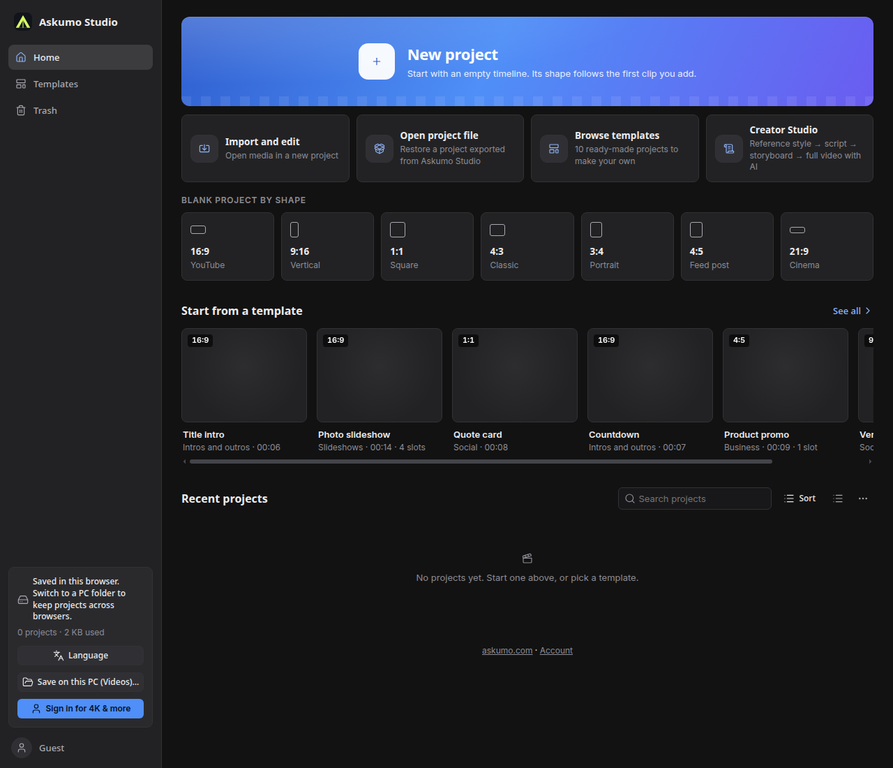
Give Askumo a topic and the storytelling style you like. Shape the script, choose a voice and captions, then bring every scene together in one guided studio.

01Shorts to long-form 02Plan from 1 to 60 min 03No camera time needed
ASKUMO / CREATOR STUDIO DRAFT READY
A.
01 02 03 04 05
STEP 01 / FORMATChoose your canvas
12 min⌄
▶00:08
SCENE 01 / VOICEOVERA story begins
with one idea.
02
03
04
✳AI storyboard
Aa
NARRATION
Voice + captions
Story, scenes and voice — togetherASKUMO CREATOR
Meet UmoYour idea has a co-pilot.✳
SCROLL TO EXPLORE
01THE CREATOR WORKFLOW

FROM A SPARK TO A STORYBOARD

One idea.
Every scene.

A clear, guided process turns your topic and reference into a video plan you can review, direct and produce—without starting from a blank timeline.

01 / FORMATYOUR PROJECT, IN PROGRESS
TSTYLE REFERENCETranscript added✓
♫VOICE & CAPTIONSVoice selected✓
✳SCENE ASSEMBLYStoryboard ready to review
Draft saved in your browser01 / 05
02MADE FOR FACELESS CREATION

THE WHOLE CREATIVE LOOP

More than a script.
A finished direction.

From the first reference to the final timeline, each choice stays connected to the story you want to tell.

01 / STORY

Write with a reference, not a blank page.

Use a transcript as a guide to pacing and storytelling, then add your own topic and creative notes. The result starts with your direction.

TOPIC + TRANSCRIPT + STYLE↗
02 / VOICE

Set the voice. Keep the rhythm.

Choose a narrator, caption look and frame ratio that match your channel and audience.

NARRATION + CAPTIONS↗
03 / VISUALS

Choose how scenes come to life.

Generate scene images with your configured AI provider or import images you created in Flow.

OPENROUTER / GOOGLE / FLOW↗
03YOUR PRODUCTION, YOUR CALL

AUTOMATION WITH ROOM TO DIRECT

Let AI build the first cut.
You make it yours.

Askumo can assemble the script, storyboard, scene visuals, narration and captions into an editable project. Review the scenes, change what you like and export when it feels right.

Explore Creator Studio↗
✳AUTOMATED ROUTE

Generate the scenes in Askumo.

Use the AI image and voice providers configured for your studio to build a first pass directly into the timeline.

OpenRouterGoogle AITTS
↗BRING YOUR OWN VISUALS

Create images in Flow. Assemble here.

Use the scene prompts to make the images in Flow, import the finished set and let Askumo place them against your script and narration.

Flow imagesStoryboardEditable timeline

A LITTLE CHARACTER. A BIG CREATIVE ENERGY.

Say hello
to Umo.

Ask + Umo. A friendly face for the ideas, drafts and late-night “what ifs” that become your next video.

YOUR CREATIVE CO-PILOT
04STRAIGHTFORWARD ACCESS

START SMALL. SCALE YOUR WORKFLOW.

Pay for the tools
you actually use.

Tarayıcı editörüyle başla, gerektiğinde AI ekle; uzun video için ayrılmış aylık Creator planını seç. AI paketi de Creator Studio’nun kademeli erişim sürecinde sınırlı kullanım hakkı sağlayabilir.

BROWSER EDITORONE-TIME

Studio access

$2once

A one-time unlock for the browser editing studio.

  • Multi-track video and audio editing
  • Bring your own media
  • Review, refine and export
Get studio access↗
LONG-FORM AUTOMATIONMONTHLY PLAN

Creator Studio

$20/ month

Uzun video üretimi ve aylık render kotası için ayrılmış plan.

  • Plan videos from 1 to 60 minutes
  • Default allowance: 60 rendered minutes/month
  • Script → storyboard → voice + scenes
Explore Creator Studio↗

Gösterilen ücretler mevcut varsayılanlardır. Kademeli erişim sürecinde tek seferlik AI paketi Creator Studio’yu sınırlı kullanma hakkı da sağlayabilir. AI sonuçları etkin sağlayıcılara, kullanılabilir kotalara ve hesap yetkilerine bağlıdır.

05GOOD TO KNOW

BEFORE YOU HIT PRODUCE

A few useful
answers.

Can I make both Shorts and long videos?+

Yes. Choose a vertical or widescreen frame and plan a video from 1 to 60 minutes. Your monthly Creator rendering allowance is separate from the length setting.

Does the $2 editor purchase include AI video generation?+

Hayır. $2 yalnızca editör erişimi sağlar. $5’lık AI paketi tek seferliktir ve mevcut kademeli erişim sürecinde Creator Studio’yu sınırlı kullanma hakkı da sağlar (varsayılan olarak ayda 60 render dakikası). $20/ay Creator planı, etkinleştirilmişse özel aylık seçenektir; açık ürünleri checkout sayfasında doğrula.

Can I use my own Flow images?+

Yes. Creator Studio can use imported scene images alongside its generated scenes. The current Flow route is a guided export-and-import workflow, not an automatic Flow account connection.

Does Askumo copy the reference video?+

No. A transcript and style note guide structure and tone. Review and rewrite the script so your final video uses original wording, visuals and ideas you have rights to use.

What affects generation and export?+

AI production depends on enabled providers, API availability and account limits. Browser editing and rendering performance depend on your computer, browser and project size.

YOUR NEXT VIDEO STARTS WITH AN IDEA

Make the story.
Skip the blank page.

Bring your topic, choose a direction and let the workflow take shape.

Open Askumo Studio
SCRIPT IN.
STORY OUT.